
Point of Sale API Developer Guide
Introduction
This article describes the Loyalty APIs that allow third-party Point of Sale (POS) systems, such as MICROS RES, RICS, and Squirrel POS, to communicate with the Loyalty platform.
The intended audience for this article are developers responsible for integrating third-party POS systems with Loyalty. These developers require technical knowledge for invoking and debugging API calls using OAuth, REST, and JSON.
Use Cases
The Loyalty POS APIs supports the following use cases:
-
Assign a Member to a transaction
-
Unassign a Member from a transaction
-
Submit a transaction to Loyalty
-
Get Member summary / balance
-
Activate a physical card
-
Replace a physical card
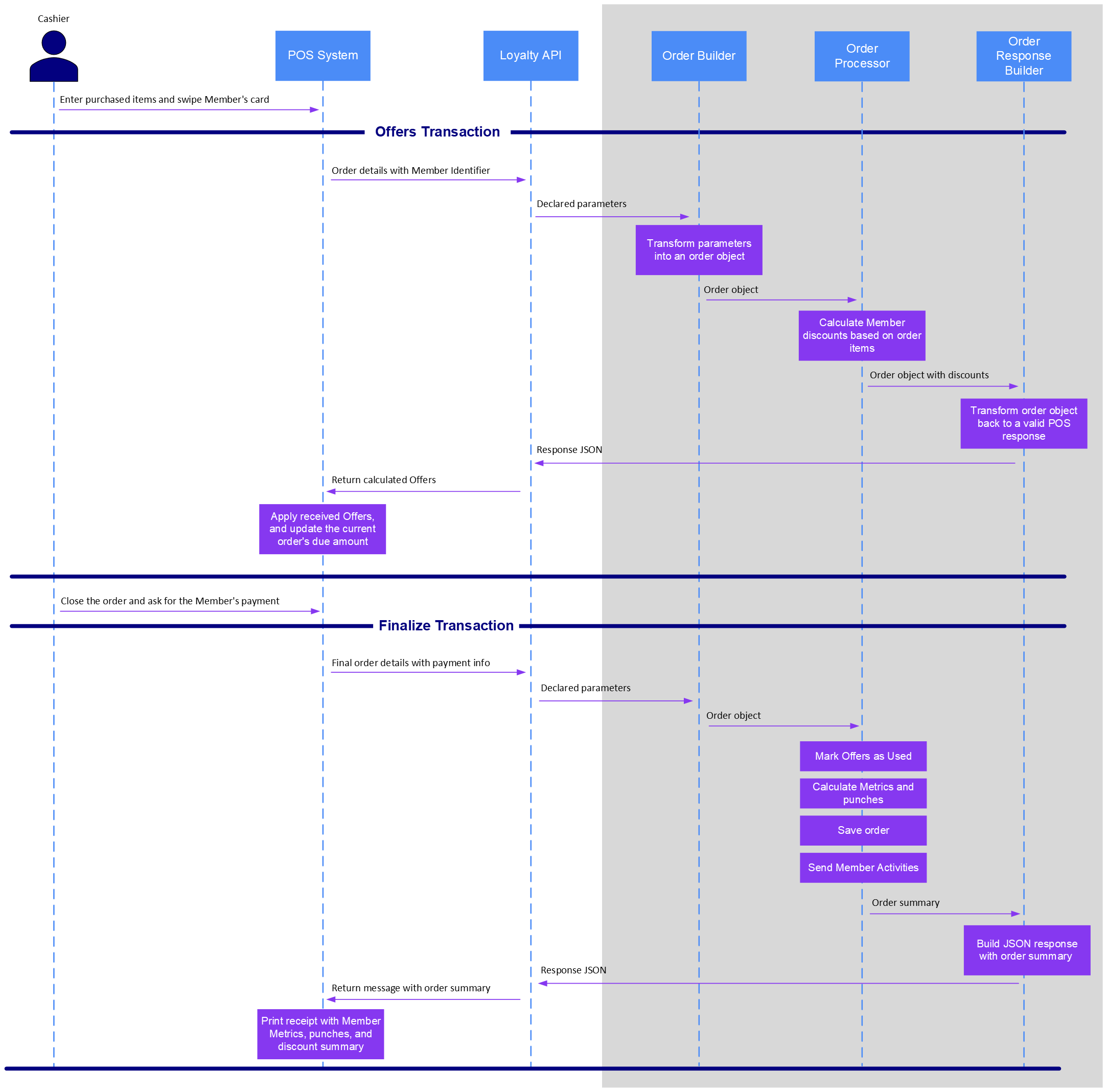
The sequence diagram below describes a typical flow of API calls between the POS system and the Loyalty platform.
API Details
This section describes the API endpoints, with their corresponding parameter and response structures.
These endpoints can be accessed via either Loyalty’s Member API or Program API.
-
Program API base URL: /program/api/pos/stellar
-
Member API base URL: /api/pos/stellar
The owner of the access_token is set as the primary account in each API request.
Assign Member (“Get Offers Transaction”)
Clients can use this API to validate a Member, and to apply qualifying discounts earned from previous transactions. The POS system is responsible for applying the discounts to the open transaction.
This API utilizes Loyalty’s Discount Service to calculate the available discounts. The POS system submits the transaction line items, then this API validates the Member account and returns all possible rewards. The POS system should call this API every time the transaction details changes, such as after adding or removing of items, comps, or other discounts on the transaction.
PUT <base_url>?access_token=<access_token>
{
    "status": String,
    "timestamp": Timestamp,
    "store_id": String,
    "terminal_id": String,
    "transaction_id": String,
    "operator_id": String,
    "accounts": [
        {
            "identifier": String,
            "identifier_type": String
        }
    ],
    "items": [
        {
            "level": Integer,
            "line_number": Integer,
            "parent_line_number": Integer,
            "name": String,
            "description": String,
            "sku": String,
            "categories": Array,
            "quantity": Decimal,
            "unit_price": Decimal,
            "discountable": Boolean
        }
    ],
"    coupons": [
        {
            "type": String,
            "pos_code": String,
            "stellar_code": String,
            "name": String,
            "quantity": Float,
            "value": BigDecimal,
            "items": [
                {
                    "line_number": Integer
                }
            ]
        }
    ],
    "summary":
        {
            "subtotal": Decimal,
            "discount": Decimal,
            "service_charge": Decimal,
            "tax": Decimal,
            "payment": Decimal
        }
Below is a sample request message.
{
    "status": "assign_member",
    "timestamp": "2017-09-27T00:00:00Z",
    "store_id": "1",
    "terminal_id": "1",
    "transaction_id": "1",
    "operator_id": "1",
    "accounts": [
        {
            "identifier": "6011888052563949",
            "identifier_type": "card_id"
        }
    ],
    "items": [
        {
            "level": 0,
            "line_number": 1,
            "parent_line_number": 0,
            "name": "Fries",
            "description": "Cheese Fries",
            "sku": "401301",
            "categories": [
                "102"
            ],
            "quantity": 1,
            "unit_price": 5.25,
            "discountable": true
        }
    ],
    "coupons": [],
    "summary":
        {
            "subtotal": 6.25,
            "discount": 0,
            "service_charge": 0,
            "tax": 1,
            "payment": 0
        }
    }
Below is a sample response message to the above request.
{
    "messages": {
        "display": [
            {
                "message": "Adding guest - Michael Jordan.\\n\\nApplied the
following rewards:\\nFree Fries"
            }
        ],
        "receipt": []
    },
    "accounts": [
        {
            "identifier": "michael@jordan.com",
            "valid": true,
            "name": "Michael Jordan",
            "member_id": "S-000105990"
        }
    ],
    "add_coupons": [
        {
            "type": "stellar",
            "pos_code": "904",
            "stellar_code": "OfferResponse-1",
            "name": "Free Fries",
            "quantity": 1,
            "value": 5.25,
            "items": [
                {
                    "line_number": "1"
                }
            ]
        ]
    }
Unassign Member
Clients can use this API to unassign a previously assigned Member from an open transaction. For example, after swiping a wrong card or entering an incorrect phone number on the POS system. This API instructs the Loyalty platform to remove the Member from the current transaction, and to make the Member’s discounts available for another transaction.
PUT <base_url>?access_token=<access_token>
{
    "status": "unassign_member",
    "timestamp": Timestamp,
    "store_id": String,
    "terminal_id": String,
    "transaction_id": String, "operator_id": String,
    "accounts": [
        {
            "identifier": String,
            "identifier_type": String
        }
    ]
}
Below is a sample request message.
{
    "status": "unassign_member",
    "timestamp": "2017-09-27T00:00:00Z",
    "store_id": "1",
    "terminal_id": "1",
    "transaction_id": "1",
    "operator_id": "1", "accounts": [
        {
            "identifier": "6011888052563949",
            "identifier_type": "card_id"
        }
    ]
}
Below is a sample response message to the above request.
{
    "messages":
        {
            "display": [
                {
                    "message": "Unassigned guest - Michael Jordan."
                }
            ],
            "receipt": []
        },
    "accounts": [
        {
            "identifier": "6011888052563949",
            "valid": true,
            "name": "Michael Jordan",
            "member_id": "S-000105990"
        }
    ],
    "remove_coupons": [
        {
            "type": "stellar", "pos_code": "904",
            "stellar_code": "OfferResponse-1",
            "name": "Free Fries",
            "quantity": 1,
            "value": 5.25,
            "items": [
                {
                    "line_number": "1"
                }
            ]
        }
    ]
}
Finalize Transaction (“Submit Transaction”)
After all items are input into the transaction, clients can use this API to finalize and close the transaction with Loyalty. This API logs the transaction with the previously assigned Member, and performs all possible calculations for the Member to accrue Metrics, earn discounts, trigger emails, and so on. This API marks discounts that were used in the transaction as "Used." This API responds with messages that the POS could display or print on a receipt.
Shell Account
In the case when the Member does not exist in the Loyalty database based on their identifier, the platform will create a shell "visitor" account with the profile Attributes specified in the POST request. After creating the shell account, Loyalty assigns the transaction to this new account.
In the case where the profile Attributes are in conflict with an existing Member account, the shell account will be created without the Attributes, so that the card issued continues to work.
In the case when the primary identifier is in conflict (e.g., card ID, phone number, email), then the account will not be created. However, a conflict could occur in the secondary identifier. For example, let's say the account is identified by phone number in the identifier field, and email is passed in the profile section, and the email has an issue but the phone number is valid. In this scenario, Loyalty creates the new account but leaves the email not updated. In this same example, if the phone number already exists, then Loyalty will not create the new account.
Update Profile
This API will try to update profile Attributes for existing Members based on their identifier. In case the profile update fails, then the transaction will be assigned to the Member without updating their profile.
POST <base_url>?access_token=<access_token>
{
    "status": String,
    "timestamp": Timestamp,
    "store_id": String,
    "terminal_id": String,
    "transaction_id": String,
    "operator_id": String,
    "accounts": [
        {
            "identifier": String,
            "identifier_type": String
            "profile":
                {
                    "member_attribute_name":"<value">,
                    "member_attribute_name":"<value">,
                    "member_attribute_name":"<value">
                }
            }
        ],
        "items": [
            {
                "level": Integer,
                "line_number": Integer,
                "parent_line_number": Integer,
                "name": String,
                "description": String,
                "sku": String,
                "categories": Array,
                "quantity": Decimal,
                "unit_price": Decimal,
                "discountable": Boolean
            }
        ],
        "coupons": [
            {
                "type": String,
                "pos_code": String,
                "stellar_code": String,
                "name": String,
                "quantity": Float,
                "value": BigDecimal,
                "items": [
                    {
                        "line_number": Integer
                    }
                ]
            }
        ],
        "summary":
            {
                "subtotal": Decimal,
                "discount": Decimal,
                "service_charge": Decimal,
                "tax": Decimal,
                "payment": Decimal
            }
        }
Below is a sample request message.
{
    "status": "submit_transaction",
    "timestamp": "2017-09-27T00:00:00Z",
    "store_id": "1",
    "terminal_id": "1",
    "transaction_id": "1",
    "operator_id": "1",
    "accounts": [
        {
            "identifier": "6011888052563949",
            "identifier_type": "card_id"
        }
    ],
    "items": [
        {
            "level": 0,
            "line_number": 1,
            "parent_line_number": 0,
            "name": "Fries",
            "description": "Cheese Fries",
            "sku": "401301",
            "categories": [
                "102"
            ],
            "quantity": 1,
            "unit_price": 5.25,
            "discountable": true
        }
    ],
    "coupons": [
        {
            "type": "stellar", "pos_code": "904",
            "stellar_code": "OfferResponse-1",
            "name": "Free Fries",
            "quantity": 1,
            "value": 5.25, "items": [
                {
                    "line_number": "1"
                }
            ]
        }
    ],
    "summary":
        {
            "subtotal": 1.00,
            "discount": 5.25,
            "service_charge": 0.00,
            "tax": 1.00,
            "payment": 0.00
        }
    }
Below is a sample response message to the above request.
{
    "messages":
        {
            "display": [
                {
                    "message": "Thank you and come again soon!"
                }
            ],
            "receipt": []
        },
    "accounts": [
        {
            "identifier": "michael@jordan.com",
            "valid": true,
            "name": "Michael Jordan",
            "member_id": "S-000105990"
        }
    ]
}
Get Member Summary
This API allows the cashier to look up a Member’s current balance and available discounts.
PUT <base_url>?access_token=<access_token>
{
    "status": "member_summary",
    "timestamp": Timestamp,
    "store_id": String,
    "terminal_id": String,
    "transaction_id": String,
    "operator_id": String,
    "accounts": [
        {
            "identifier": String,
            "identifier_type": String
        }
    ]
}
Below is a sample request message.
{
    "status": "member_summary",
    "timestamp": "2017-09-27T00:00:00Z",
    "store_id": "1",
    "terminal_id": "1",
    "transaction_id": "1",
    "operator_id": "1",
    "accounts": [
        {
            "identifier": "370615108474724",
            "identifier_type": "card_id"
        }
    ]
}
Below is a sample response message to the above request.
{
    "messages":
        {
            "display": [
                {
                    "message":"Name: Michael Jordan\\nMember ID:
S-000105990\\nBalance: 100 points\\n\\nRewards:\\n(2) Free Fries\\nFree
Pizza\\n(2) $5-Gift Cards with $10.00-value"
                }
            ],
            "receipt": []
        },
    "accounts": [
        {
            "identifier": "370615108474724",
            "valid": true,
            "name": "Michael Jordan",
            "member_id": "S-000105990"
        }
    ]
}
Activate Card
This API allows the cashier to activate a new loyalty card. In this process, Loyalty creates a shell "visitor" account that is eligible to earn Metrics and other rewards on every transaction. After this process, the customer is expected to register online and update this shell account to complete their registration process. Only from that point will the customer will be able to use and redeem any of their previously earned Metrics and rewards.
Card activation can be done in two ways: with or without any pending transaction.
API Without Transaction
This API supports the scenario where the customer only wants to activate their card without making a purchase.
PUT <base_url>?access_token=<access_token>
{
    "status": "activate_card",
    "timestamp": Timestamp,
    "store_id": String,
    "terminal_id": String,
    "transaction_id": String,
    "operator_id": String,
     "accounts": [
        {
            "identifier": String,
            "identifier_type": String
        }
    ]
}
Below is a sample request message.
{
    "status": "activate_card",
    "timestamp": "2017-09-27T00:00:00Z",
    "store_id": "1",
    "terminal_id": "1",
    "transaction_id": "1",
    "operator_id": "1",
    "accounts": [
        {
            "identifier": "370615108474724",
            "identifier_type": "card_id"
        }
    ]
}
Below is a sample response message to the above request.
{
    "messages":
        {
            "display": [
                {
                    "message": "Card #370615108474724 activated."
                }
            ],
            "receipt": []
        },
    "accounts": [
        {
            "identifier": "370615108474724",
            "valid": true
        }
    ]
}
API With a Transaction
Clients can this API to link a pending transaction to the shell account that Loyalty will create upon closing the transaction.
PUT <base_url>?access_token=<access_token>
{
    "status": String,
    "timestamp": Timestamp,
    "store_id": String,
    "terminal_id": String,
    "transaction_id": String,
    "operator_id": String,
    "accounts": [
        {
            "identifier": String,
            "identifier_type": String
        }
    ],
    "items": [
        {
            "level": Integer,
            "line_number": Integer,
            "parent_line_number": Integer,
            "name": String,
            "description": String,
            "sku": String,
            "categories": Array,
            "quantity": Decimal,
            "unit_price": Decimal,
            "discountable": Boolean
        }
    ],
    "coupons": Array,
    "summary":
        {
            "subtotal": Decimal,
            "discount": Decimal,
            "service_charge": Decimal,
            "tax": Decimal,
            "payment": Decimal
        }
    }
Below is a sample request message.
{
    "status": "assign_member",
    "timestamp": "2017-09-27T00:00:00Z",
    "store_id": "1",
    "terminal_id": "1",
    "transaction_id": "1",
    "operator_id": "1",
    "accounts": [
        {
            "identifier": "370615108474724",
            "identifier_type": "card_id"
        }
    ],
    "items": [
        {
            "level": 0,
            "line_number": 1,
            "parent_line_number": 0,
            "name": "Fries",
            "description": "Cheese Fries",
            "sku": "401301",
            "categories": [
                "102"
                ],
            "quantity": 1,
            "unit_price": 5.25,
            "discountable": true
        }
    ],
    "coupons": [],
    "summary":
        {
            "subtotal": 6.25,
            "discount": 0.00,
            "service_charge": 0.00,
            "tax": 1.00,
            "payment": 0.00
        }
    }
Below is a sample response message to the above request.
{
    "messages":
        {
            "display": [
                {
                    "message": "About to activate card #370615108474724.\\n Remind guest to register online to get\\n credit for their purchase."
                }
            ],
        "receipt": []
    },
    "accounts": [
        {
            "identifier": "370615108474724",
            "valid": true
        }
    ]
}
Replace Card
Clients can use this API to change the card ID for an existing Member account (for example, if the Member loses or damages their existing card). This API expects a Member identifier to retrieve the existing Member account and a new card ID to assign to the Member account.
PUT <base_url>?access_token=<access_token>
{
    "status": "replace_card",
    "timestamp": Timestamp,
    "store_id": String,
    "terminal_id": String,
    "transaction_id": String,
    "operator_id": String,
    "accounts": [
        {
            "identifier": String,
            "identifier_type": String
        },
        {
            "identifier": String,
            "identifier_type": String
        }
    ]
}
Below is a sample request message.
{
    "status": "replace_card",
    "timestamp": "2017-09-27T00:00:00Z",
    "store_id": "1",
    "terminal_id": "1",
    "transaction_id": "1",
    "operator_id": "1",
    "accounts": [
        {
            "identifier": "michael@jordan.com",
            "identifier_type": "email"
        },
        {
            "identifier": "6011888052563949",
            "identifier_type": "card_id"
        }
    ]
}
Below is a sample response message to the above request.
{
    "messages":
        {
            "display": [
                {
                    "message": "Card #6011888052563949 is now associated\\n to
guest - Michael Jordan."
                }
            ],
            "receipt": []
        },
    "accounts": [
        {
            "identifier": "michael@jordan.com",
            "valid": true,
            "name": "Michael Jordan",
            "member_id": "S-000105990"
        },
        {
            "identifier": "6011888052563949",
            "valid": true
        }
    ]
}
